Testing
GraphQL MCP includes a built-in web-based inspector for testing and debugging your MCP tools.
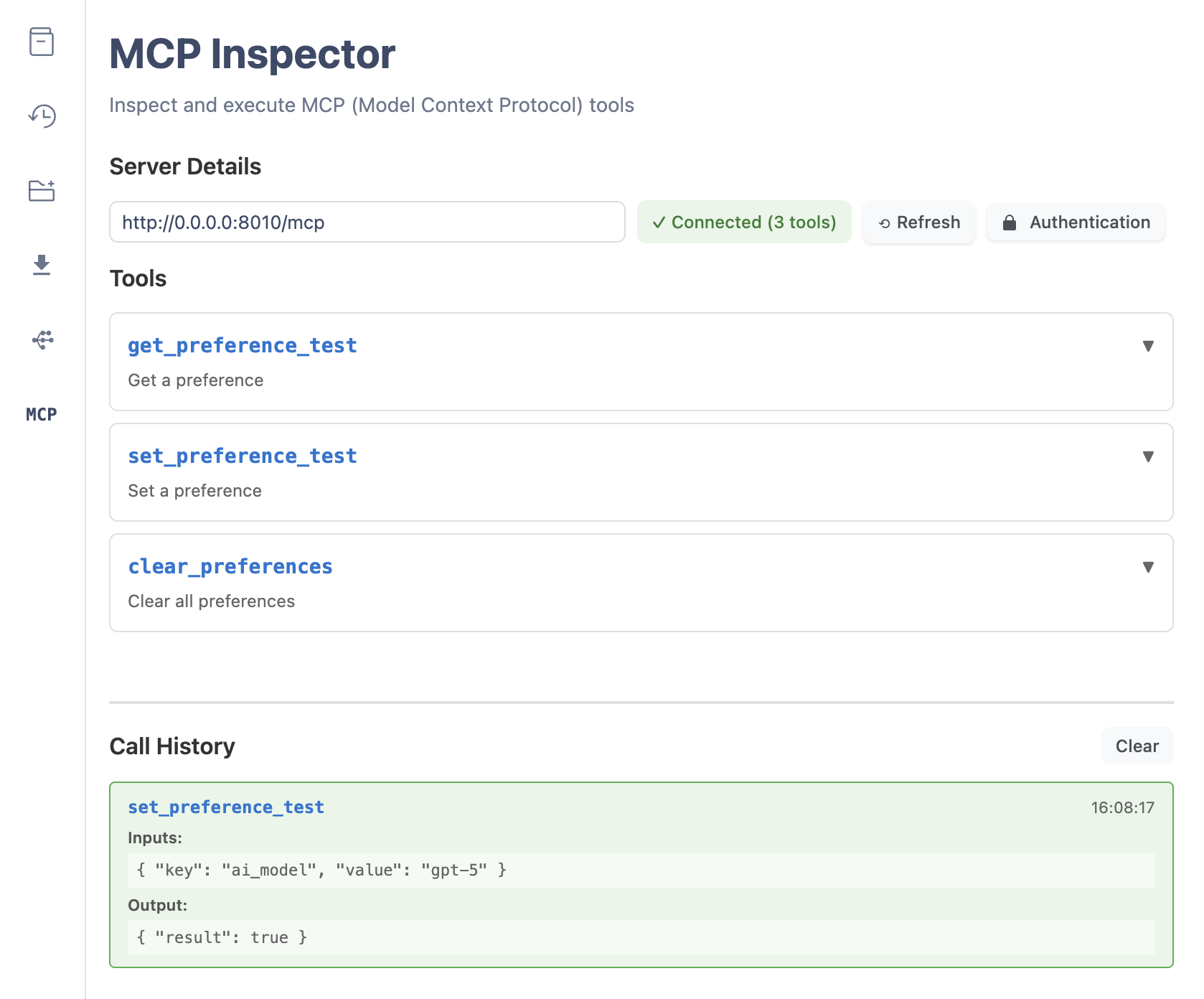
MCP Inspector
The MCP Inspector is a GraphiQL-integrated interface that lets you:
- Discover Tools — Browse all MCP tools generated from your schema
- Test Tools — Execute tools with custom parameters and see results
- Add Authentication — Test with Bearer tokens, API keys, or custom headers
- Track History — Review previous tool executions
- View Schemas — Inspect parameter and output schemas for each tool
Enabling the Inspector
The inspector is enabled by default (graphql_http=True):
from graphql_mcp import GraphQLMCP

server = GraphQLMCP(schema=your_schema, graphql_http=True)
app = server.http_app()
Visit the GraphQL endpoint in your browser:
http://localhost:8002/graphqlThe inspector interface appears alongside GraphiQL.
Using the Inspector
1. Discover Available Tools
The left panel shows all MCP tools generated from your GraphQL schema — tool names (snake_case), descriptions from docstrings, and parameter information.
2. Configure Authentication
If your API requires authentication, use the authentication panel:
Bearer Token: your_token_hereOr add custom headers:
X-API-Key: your_key
Authorization: Bearer token
3. Execute Tools
- Select a tool from the list
- Fill in the parameters (JSON format)
- Click "Execute"
- View the results in the output panel
4. Review Call History
The inspector maintains a history of your tool calls — timestamp, tool name, parameters, results, and response time. Click any previous call to view details or re-execute.
Inspector vs GraphiQL
| Feature | GraphiQL | MCP Inspector |
|---|---|---|
| Purpose | Test GraphQL queries | Test MCP tools |
| Input Format | GraphQL query language | JSON parameters |
| Schema View | GraphQL SDL | MCP tool schemas |
| Use Case | GraphQL development | MCP integration testing |
Both are available simultaneously at /graphql.
Disabling in Production
Disable both GraphiQL and the MCP Inspector for production:
server = GraphQLMCP(schema=your_schema, graphql_http=False)See Deployment for full production configuration.
Testing with MCP Clients
You can also test programmatically with any MCP client:
from mcp import ClientSession
from mcp.client.stdio import stdio_client

async def test_mcp():
    async with stdio_client() as (read, write):
        async with ClientSession(read, write) as session:
            await session.initialize()

            tools = await session.list_tools()
            print(f"Available tools: {tools}")

            result = await session.call_tool("hello", arguments={"name": "Alice"})
            print(f"Result: {result}")

import asyncio
asyncio.run(test_mcp())
Debugging Tips
Tool Not Appearing
- Check that the field is defined in your GraphQL schema
- Ensure the field has a description/docstring
- Verify mutations are enabled (
allow_mutations=True)
Authentication Errors
- Verify token format (include "Bearer " prefix if required)
- Check token hasn't expired
- Ensure auth configuration matches your API
Type Errors
- Check parameter types match the schema
- Use proper JSON format for complex types
- Review the schema panel for expected types
Next Steps
- How It Works — Understand tool generation mechanics
- Customization — Configure authentication and middleware
- API Reference — Full parameter reference